
GameBuff Halo: The Master Chief Collection Trainer Anti-Cheat Desativar Processo de Operação
Tempo de liberação 2025/07/11
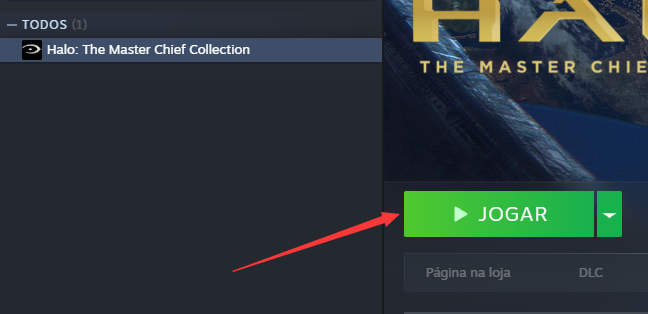
1. Primeiro, abra o Steam, encontre o jogo Halo Collection e clique em Iniciar Jogo.
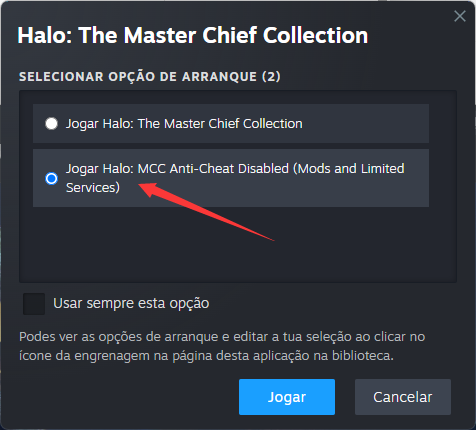
2. Quando a janela a seguir aparecer, selecione “Jogar Halo: MCC Anti-Cheat Desativado” e clique em “Iniciar”.
3. Uma vez no jogo, abra o software GameBuff e clique em «Adicionar um BUFF» para modificar as configurações dentro do jogo.
Para a plataforma Xbox no PC:
1. Abra o Xbox App no seu computador.
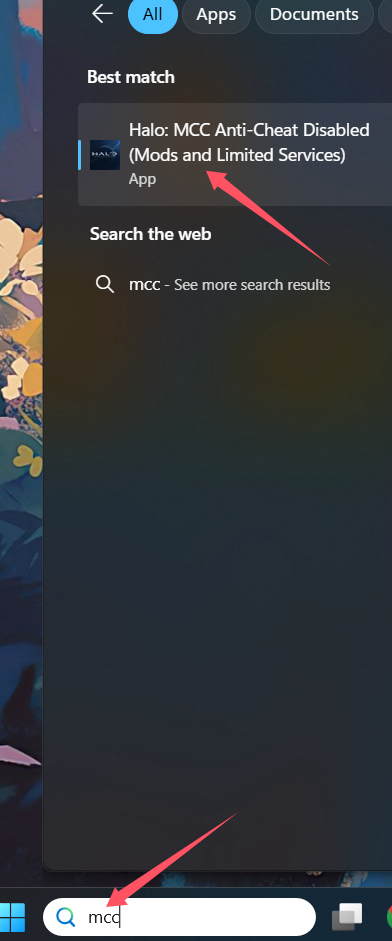
2. Na barra de pesquisa, digite MCC.
3. Selecione Halo: MCC Anti-Cheat Disabled (Mods and Limited Services).
4. Clique em Iniciar Jogo para executá-lo.
Artigo anterior
próximo artigo O «Full Throttle Fishing» (Como Pescar) da GameBuff já está oficialmente disponível — Saúde infinita, mordidas instantâneas e dinheiro extra. Desfruta da diversão da pesca com facilidade!
- Detroit: Become Human
- Baldur's Gate 3
- Sons of The Forest
- Dead Island 2
- Total War: Warhammer III
- Wall World 2
- Super Fantasy Kingdom
- PowerWash Simulator 2
- The Witcher 3: Wild Hunt
- Nioh 2 – The Complete Edition
- The Outer Worlds 2
- Sekiro Shadows Die Twice
- Escape the Backrooms
- STAR WARS™: Battlefront Classic Collection
- DAVE THE DIVER
- ACE COMBAT 7: SKIES UNKNOWN
- The First Berserker: Khazan
- SWORD ART ONLINE Fractured Daydream
- Sid Meier's Civilization VI
- Monster Hunter: World
- Resident Evil Village
- No Man's Sky
- Assetto Corsa Rally
- Assassin's Creed Valhalla
- Terraria
- Dying Light 2 Stay Human
- Dark Souls 3
- PEAK
- Dragon Quest 1 and 2 Remak
- Anno 117: Pax Romana
- Anno 117: Pax Romana Demo
- Need for Speed Unbound
- Yakuza 0 Director's Cut
- INAZUMA ELEVEN: Victory Road
- Red Dead Redemption 2
- MONSTER HUNTER RISE
- theHunter: Call of the Wild
- ELDEN RING
- Horizon Forbidden West Complete Edition
- Crusader Kings III
- Metaphor: ReFantazio
- Europa Universalis 5
- Stardew Valley
- Dispatch
- Hearts of Iron IV
- God of War
- Europa Universalis V
- R.E.P.O.
