
GameBuff Halo: The Master Chief Collection トレーナー チート対策 無効化 操作手順
リリース時間 2025/07/11
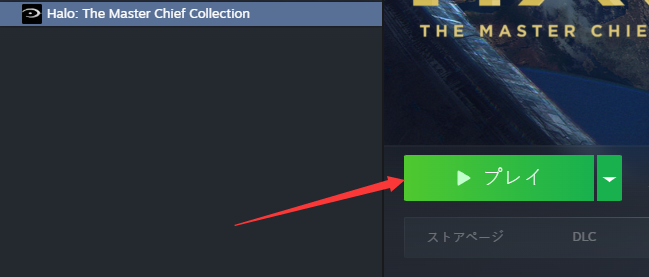
1. まず、Steamを起動し、Halo Collectionゲームを見つけ、ゲーム開始をクリックします。
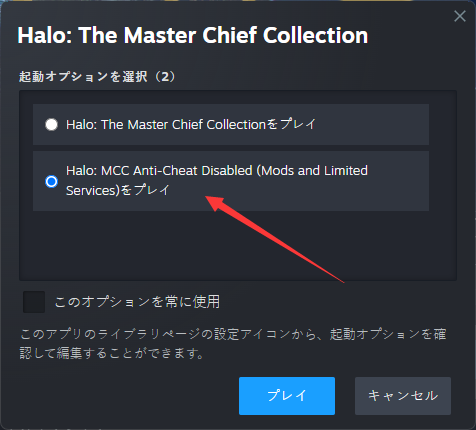
2. 以下のウィンドウが表示されたら、「Play Halo: MCC Anti-Cheat Disabled 」を選択し、「Start 」をクリックする。
3. ゲーム内でGameBuffソフトウェアを開き、「BUFFを追加」をクリックしてゲーム内の設定を変更する。
Xbox Game Pass
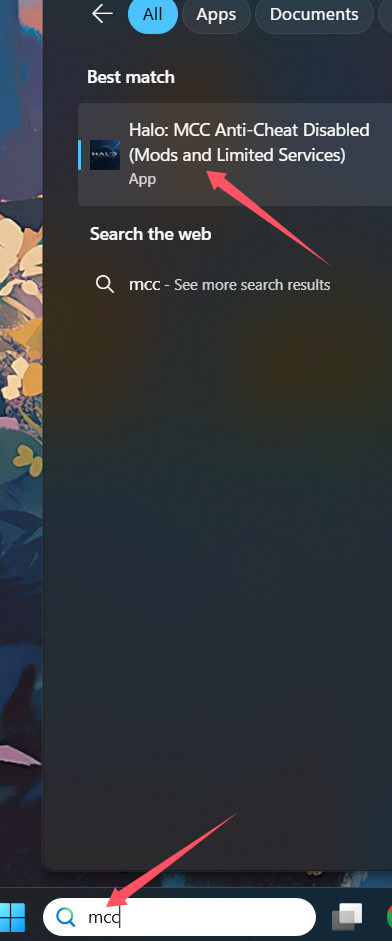
PC版Xboxプラットフォームの場合、検索バーで「MCC」と検索し、「Halo: MCC Anti-Cheat Disabled (Mods and Limited Services)」をクリックしてゲームを起動してください
- Detroit: Become Human
- Baldur's Gate 3
- Sons of The Forest
- Dead Island 2
- Total War: Warhammer III
- Wall World 2
- Super Fantasy Kingdom
- PowerWash Simulator 2
- The Witcher 3: Wild Hunt
- Nioh 2 – The Complete Edition
- The Outer Worlds 2
- Sekiro Shadows Die Twice
- Escape the Backrooms
- STAR WARS™: Battlefront Classic Collection
- DAVE THE DIVER
- ACE COMBAT 7: SKIES UNKNOWN
- The First Berserker: Khazan
- SWORD ART ONLINE Fractured Daydream
- Sid Meier's Civilization VI
- Monster Hunter: World
- Resident Evil Village
- No Man's Sky
- Assetto Corsa Rally
- Assassin's Creed Valhalla
- Terraria
- Dying Light 2 Stay Human
- Dark Souls 3
- PEAK
- Dragon Quest 1 and 2 Remak
- Anno 117: Pax Romana
- Anno 117: Pax Romana Demo
- Need for Speed Unbound
- Yakuza 0 Director's Cut
- INAZUMA ELEVEN: Victory Road
- Red Dead Redemption 2
- MONSTER HUNTER RISE
- theHunter: Call of the Wild
- ELDEN RING
- Horizon Forbidden West Complete Edition
- Crusader Kings III
- Metaphor: ReFantazio
- Europa Universalis 5
- Stardew Valley
- Dispatch
- Hearts of Iron IV
- God of War
- Europa Universalis V
- R.E.P.O.
