
GameBuff Halo: عملية تعطيل عملية مكافحة الغش في مجموعة The Master Chief Collection للمدرب ضد الغش
تاريخ النشر 2025/07/11
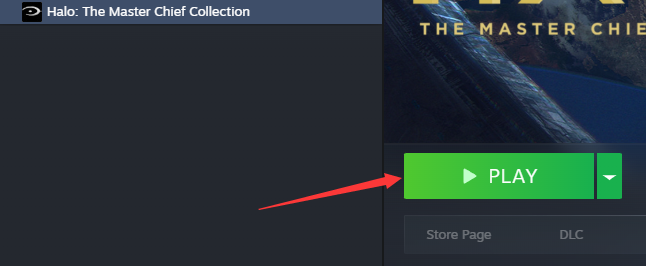
1. أولًا، افتح Steam، وابحث عن لعبة Halo Collection، وانقر على بدء اللعبة.
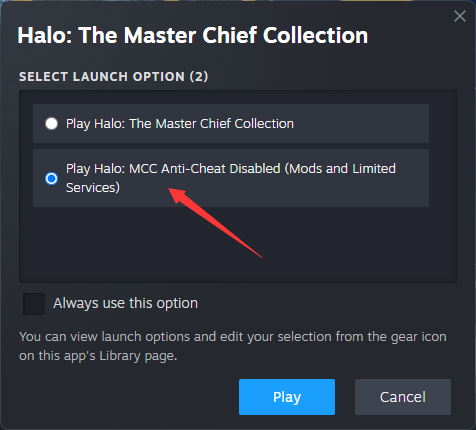
2. عندما تظهر النافذة التالية، حدد ”تشغيل Halo: MCC Anti-Cheat معطل“ وانقر على ”ابدأ“.
3. بمجرد دخول اللعبة، افتح برنامج GameBuff وانقر على ”إضافة BUFF“ لتعديل الإعدادات داخل اللعبة.
PC Xbox Platform
1. On your PC, open the Xbox App or game library.
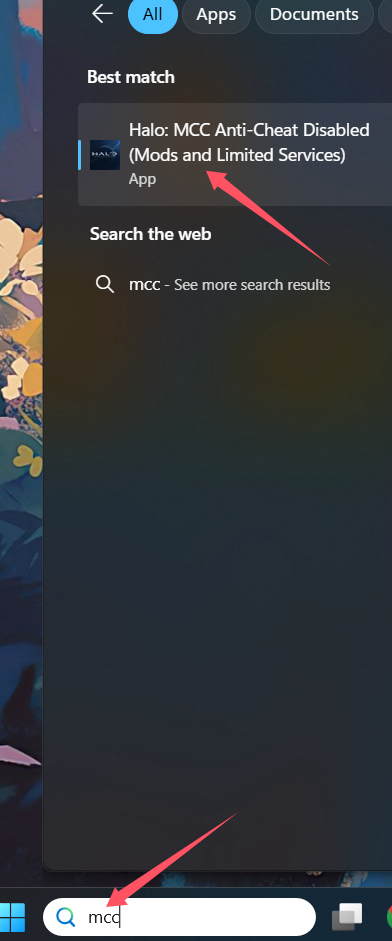
2. In the search bar, type MCC.
3. Locate and click on Halo: MCC Anti-Cheat Disabled (Mods and Limited Services).
4. Launch the game from there.
المقال السابق
المقال التالي أصبح برنامج التدريب «Full Throttle Fishing» (كيفية الصيد) من GameBuff متاحًا رسميًا الآن — صحة لا نهائية، وقضمات فورية، وأموال إضافية. استمتع بمتعة الصيد بسهولة!
- Detroit: Become Human
- Baldur's Gate 3
- Sons of The Forest
- Dead Island 2
- Total War: Warhammer III
- Wall World 2
- Super Fantasy Kingdom
- PowerWash Simulator 2
- The Witcher 3: Wild Hunt
- Nioh 2 – The Complete Edition
- The Outer Worlds 2
- Sekiro Shadows Die Twice
- Escape the Backrooms
- STAR WARS™: Battlefront Classic Collection
- DAVE THE DIVER
- ACE COMBAT 7: SKIES UNKNOWN
- The First Berserker: Khazan
- SWORD ART ONLINE Fractured Daydream
- Sid Meier's Civilization VI
- Monster Hunter: World
- Resident Evil Village
- No Man's Sky
- Assetto Corsa Rally
- Assassin's Creed Valhalla
- Terraria
- Dying Light 2 Stay Human
- Dark Souls 3
- PEAK
- Dragon Quest 1 and 2 Remak
- Anno 117: Pax Romana
- Anno 117: Pax Romana Demo
- Need for Speed Unbound
- Yakuza 0 Director's Cut
- INAZUMA ELEVEN: Victory Road
- Red Dead Redemption 2
- MONSTER HUNTER RISE
- theHunter: Call of the Wild
- ELDEN RING
- Horizon Forbidden West Complete Edition
- Crusader Kings III
- Metaphor: ReFantazio
- Europa Universalis 5
- Stardew Valley
- Dispatch
- Hearts of Iron IV
- God of War
- Europa Universalis V
- R.E.P.O.
