
GameBuff Halo: The Master Chief Collection Trainer Anti-Cheat Disable Operation Process
Heure de sortie 2025/07/11
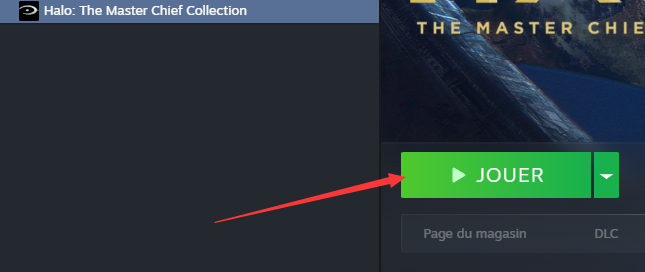
1. Ouvrez d'abord Steam, trouvez le jeu Halo Collection et cliquez sur Start Game.
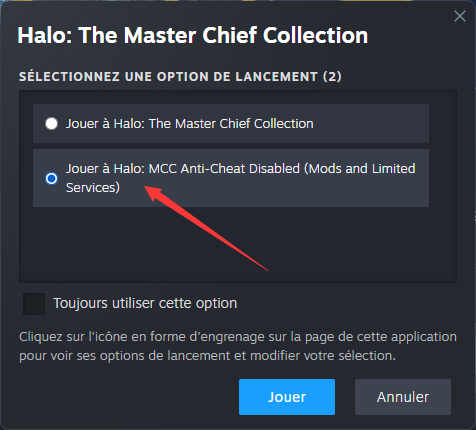
2. Lorsque la fenêtre suivante apparaît, sélectionnez « Jouer à Halo : MCC Anti-Cheat Disabled » et cliquez sur « Start ».
3. Une fois dans le jeu, ouvrez le logiciel GameBuff et cliquez sur « Add a BUFF » pour modifier les paramètres du jeu.
Pour la plateforme Xbox sur PC :
1. Ouvrez l'application Xbox sur votre ordinateur.
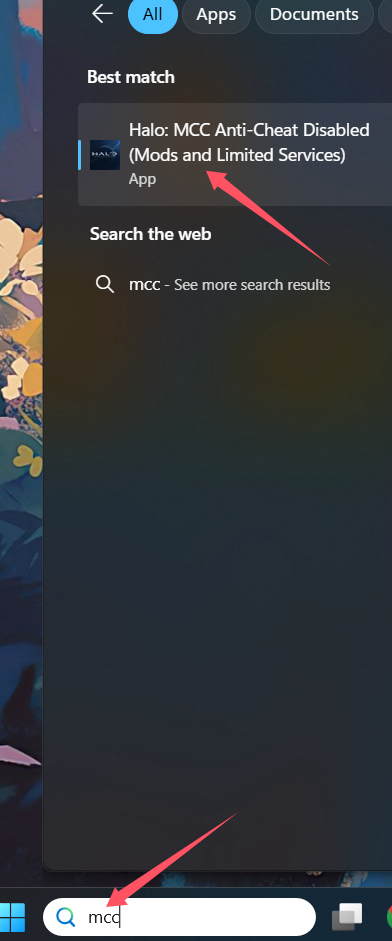
2. Utilisez la barre de recherche en haut et saisissez « MCC ».
3. Parmi les résultats, trouvez et sélectionnez « Halo: MCC Anti-Cheat Disabled (Mods and Limited Services) ».
4. Cliquez dessus pour lancer le jeu.
Article précédent
article suivant Le trainer « Full Throttle Fishing » (Comment pêcher) de GameBuff est désormais officiellement disponible : santé infinie, touches instantanées et argent supplémentaire. Profitez pleinement des joies de la pêche en toute simplicité !
- Detroit: Become Human
- Baldur's Gate 3
- Sons of The Forest
- Dead Island 2
- Total War: Warhammer III
- Wall World 2
- Super Fantasy Kingdom
- PowerWash Simulator 2
- The Witcher 3: Wild Hunt
- Nioh 2 – The Complete Edition
- The Outer Worlds 2
- Sekiro Shadows Die Twice
- Escape the Backrooms
- STAR WARS™: Battlefront Classic Collection
- DAVE THE DIVER
- ACE COMBAT 7: SKIES UNKNOWN
- The First Berserker: Khazan
- SWORD ART ONLINE Fractured Daydream
- Sid Meier's Civilization VI
- Monster Hunter: World
- Resident Evil Village
- No Man's Sky
- Assetto Corsa Rally
- Assassin's Creed Valhalla
- Terraria
- Dying Light 2 Stay Human
- Dark Souls 3
- PEAK
- Dragon Quest 1 and 2 Remak
- Anno 117: Pax Romana
- Anno 117: Pax Romana Demo
- Need for Speed Unbound
- Yakuza 0 Director's Cut
- INAZUMA ELEVEN: Victory Road
- Red Dead Redemption 2
- MONSTER HUNTER RISE
- theHunter: Call of the Wild
- ELDEN RING
- Horizon Forbidden West Complete Edition
- Crusader Kings III
- Metaphor: ReFantazio
- Europa Universalis 5
- Stardew Valley
- Dispatch
- Hearts of Iron IV
- God of War
- Europa Universalis V
- R.E.P.O.
