
GameBuff Halo: عملية تعطيل عملية مكافحة الغش في مجموعة The Master Chief Collection للمدرب ضد الغش
تاريخ النشر 2025/07/11
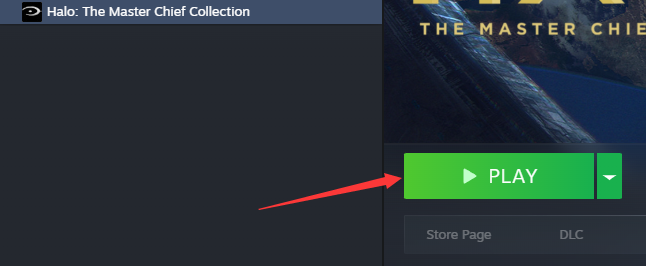
1. أولًا، افتح Steam، وابحث عن لعبة Halo Collection، وانقر على بدء اللعبة.
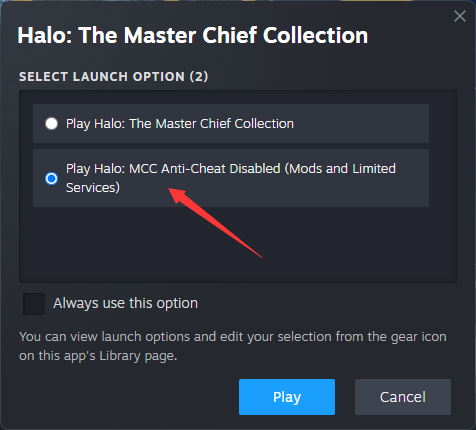
2. عندما تظهر النافذة التالية، حدد ”تشغيل Halo: MCC Anti-Cheat معطل“ وانقر على ”ابدأ“.
3. بمجرد دخول اللعبة، افتح برنامج GameBuff وانقر على ”إضافة BUFF“ لتعديل الإعدادات داخل اللعبة.
PC Xbox Platform
1. On your PC, open the Xbox App or game library.
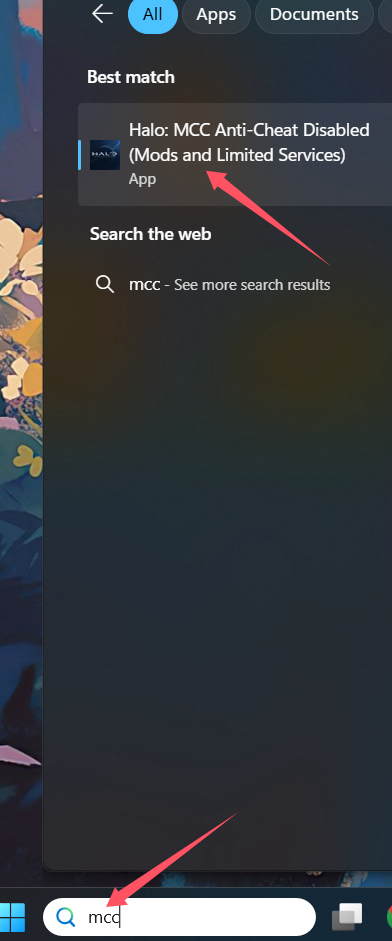
2. In the search bar, type MCC.
3. Locate and click on Halo: MCC Anti-Cheat Disabled (Mods and Limited Services).
4. Launch the game from there.
- Sekiro Shadows Die Twice
- The First Berserker: Khazan
- Hogwarts Legacy
- Assetto Corsa Rally
- Escape the Backrooms
- Mount & Blade II: Bannerlord
- Age of Wonders 4
- The Outer Worlds 2
- The Elder Scrolls V: Skyrim Special Edition(steam)
- Infection Free Zone
- Nioh 2 – The Complete Edition
- Dead Island 2
- Terraria
- Yakuza 0 Director's Cut
- Sons of The Forest
- Anno 117: Pax Romana
- R.E.P.O.
- Crusader Kings III
- MONSTER HUNTER RISE
- Palworld
- STAR WARS™: Battlefront Classic Collection
- Dying Light 2 Stay Human
- Baldur's Gate 3
- SWORD ART ONLINE Fractured Daydream
- Europa Universalis V
- Total War: Warhammer III
- Dragon Quest 1 and 2 Remak
- DAVE THE DIVER
- Hearts of Iron IV
- Grand Theft Auto V Legacy
- Football Manager 26
- Super Fantasy Kingdom
- Stardew Valley
- PEAK
- Phasmophobia
- Metaphor: ReFantazio
- theHunter: Call of the Wild
- INAZUMA ELEVEN: Victory Road
- DRAGON QUEST I & II HD-2D Remake
- Resident Evil Village
- SILENT HILL 2
- ACE COMBAT 7: SKIES UNKNOWN
- Anno 117: Pax Romana Demo
- Europa Universalis 5
- God of War
- Dispatch
- Monster Hunter: World
- Wall World 2
