
GTA5 Grand Theft Auto V como desativar o anti-cheat BE
Tempo de liberação 2025/07/04
Método 1: Configurar nas propriedades do Steam
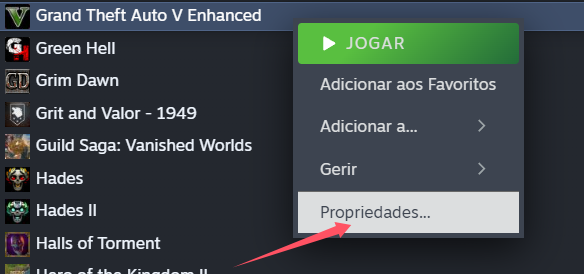
Clique com o botão direito no jogo Grand Theft Auto V (GTA 5) na sua biblioteca do Steam e selecione Propriedades.
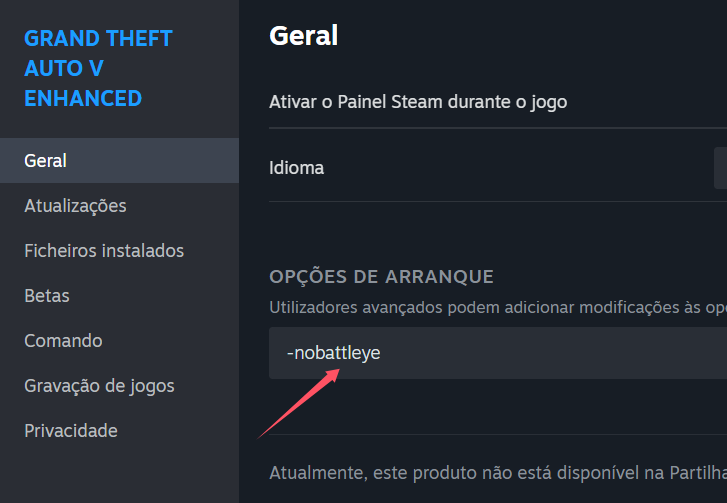
Na aba Geral, localize a opção Definir opções de inicialização.
No campo Opções de inicialização atualmente selecionadas, adicione o seguinte comando:
-nobattleye
(Importante: deixe um espaço antes do comando, se já houver outro parâmetro)
---
Método 2: Configurar no Rockstar Games Launcher
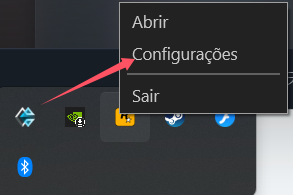
No ícone da barra de tarefas do Windows, clique em Rockstar Games Launcher > Configurações > Configurações do Launcher.
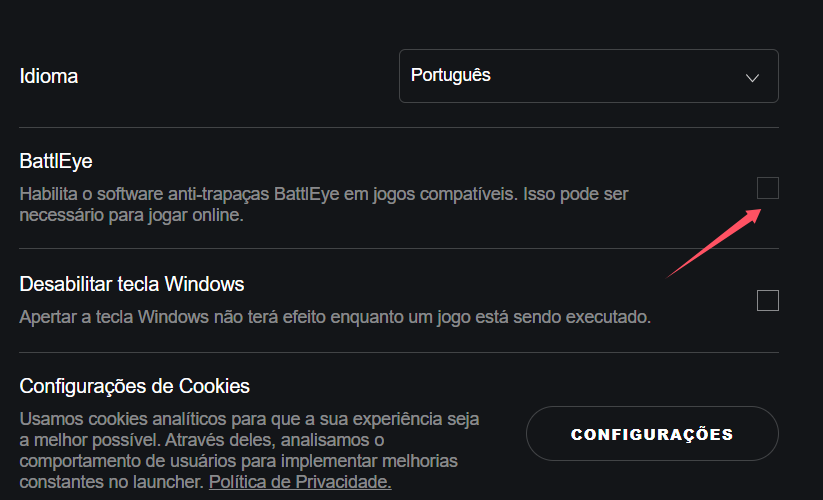
Na seção de configurações, desmarque a opção referente ao sistema anticheat BattlEye.
Após configurar pelo método desejado, reinicie o jogo.
Ao entrar no jogo, abra o software GameBuff e clique em "Adicionar BUFF" para ativar as modificações dentro do jogo.
- Detroit: Become Human
- Baldur's Gate 3
- Sons of The Forest
- Dead Island 2
- Total War: Warhammer III
- Wall World 2
- Super Fantasy Kingdom
- PowerWash Simulator 2
- The Witcher 3: Wild Hunt
- Nioh 2 – The Complete Edition
- The Outer Worlds 2
- Sekiro Shadows Die Twice
- Escape the Backrooms
- STAR WARS™: Battlefront Classic Collection
- DAVE THE DIVER
- ACE COMBAT 7: SKIES UNKNOWN
- The First Berserker: Khazan
- SWORD ART ONLINE Fractured Daydream
- Sid Meier's Civilization VI
- Monster Hunter: World
- Resident Evil Village
- No Man's Sky
- Assetto Corsa Rally
- Assassin's Creed Valhalla
- Terraria
- Dying Light 2 Stay Human
- Dark Souls 3
- PEAK
- Dragon Quest 1 and 2 Remak
- Anno 117: Pax Romana
- Anno 117: Pax Romana Demo
- Need for Speed Unbound
- Yakuza 0 Director's Cut
- INAZUMA ELEVEN: Victory Road
- Red Dead Redemption 2
- MONSTER HUNTER RISE
- theHunter: Call of the Wild
- ELDEN RING
- Horizon Forbidden West Complete Edition
- Crusader Kings III
- Metaphor: ReFantazio
- Europa Universalis 5
- Stardew Valley
- Dispatch
- Hearts of Iron IV
- God of War
- Europa Universalis V
- R.E.P.O.
