
GTA5 Grand Theft Auto V come disattivare l'anti-cheat BE
Tempo di rilascio 2025/07/04
Metodo 1: Impostare tramite le proprietà su Steam
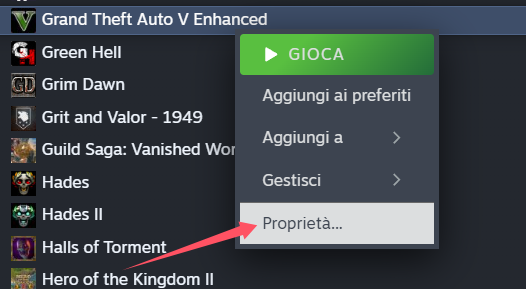
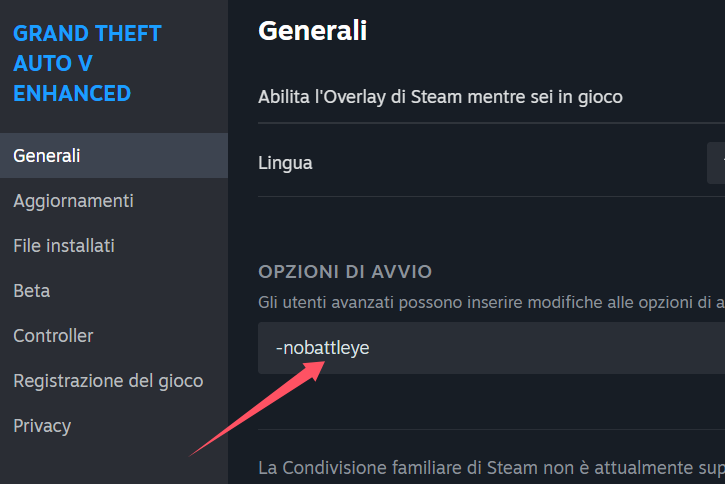
Fai clic destro su Grand Theft Auto V (GTA5) all’interno della tua libreria Steam, seleziona Proprietà, vai alla sezione Generale e poi Opzioni di avvio del gioco.
Inserisci il seguente parametro di lancio:
```
-nobattleye
```
> Nota: prima del parametro devi lasciare uno spazio se ci sono altre opzioni già presenti.
---
Metodo 2: Disattivare BattlEye nel launcher Rockstar Games
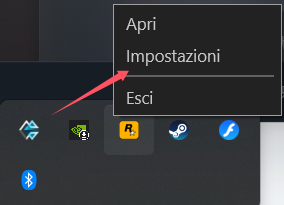
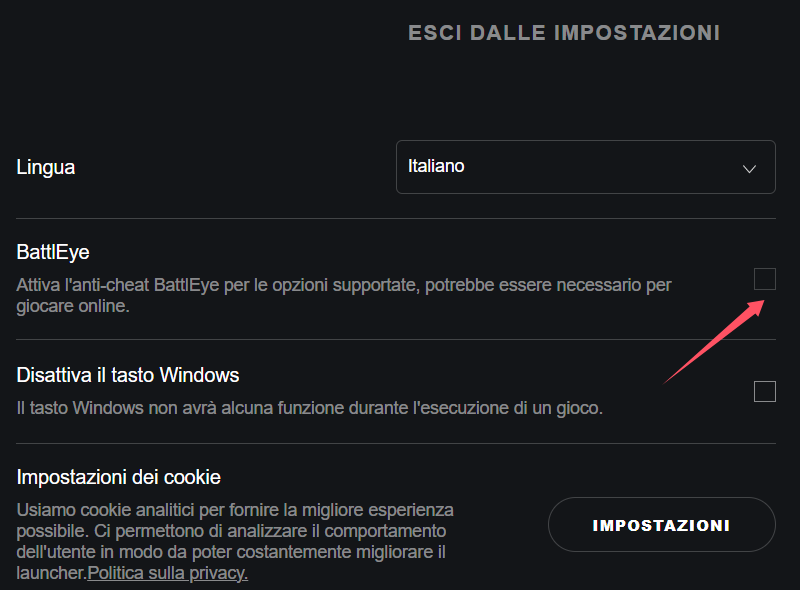
Apri il launcher Rockstar Games Launcher, vai su Impostazioni > Impostazioni Launcher, e deseleziona l’opzione per attivare il sistema anti-cheat BattlEye.
Dopo aver completato le impostazioni, riavvia il gioco.
Entra in gioco e successivamente apri il software GameBuff, quindi clicca su "Aggiungi un BUFF" per effettuare modifiche direttamente in-game.
- Detroit: Become Human
- Baldur's Gate 3
- Sons of The Forest
- Dead Island 2
- Total War: Warhammer III
- Wall World 2
- Super Fantasy Kingdom
- PowerWash Simulator 2
- The Witcher 3: Wild Hunt
- Nioh 2 – The Complete Edition
- The Outer Worlds 2
- Sekiro Shadows Die Twice
- Escape the Backrooms
- STAR WARS™: Battlefront Classic Collection
- DAVE THE DIVER
- ACE COMBAT 7: SKIES UNKNOWN
- The First Berserker: Khazan
- SWORD ART ONLINE Fractured Daydream
- Sid Meier's Civilization VI
- Monster Hunter: World
- Resident Evil Village
- No Man's Sky
- Assetto Corsa Rally
- Assassin's Creed Valhalla
- Terraria
- Dying Light 2 Stay Human
- Dark Souls 3
- PEAK
- Dragon Quest 1 and 2 Remak
- Anno 117: Pax Romana
- Anno 117: Pax Romana Demo
- Need for Speed Unbound
- Yakuza 0 Director's Cut
- INAZUMA ELEVEN: Victory Road
- Red Dead Redemption 2
- MONSTER HUNTER RISE
- theHunter: Call of the Wild
- ELDEN RING
- Horizon Forbidden West Complete Edition
- Crusader Kings III
- Metaphor: ReFantazio
- Europa Universalis 5
- Stardew Valley
- Dispatch
- Hearts of Iron IV
- God of War
- Europa Universalis V
- R.E.P.O.
