
GameBuff Watch_Dogs2 Modifier Anti-Cheat Disable Operation Process
Release time 2025/07/07
Uplay Version
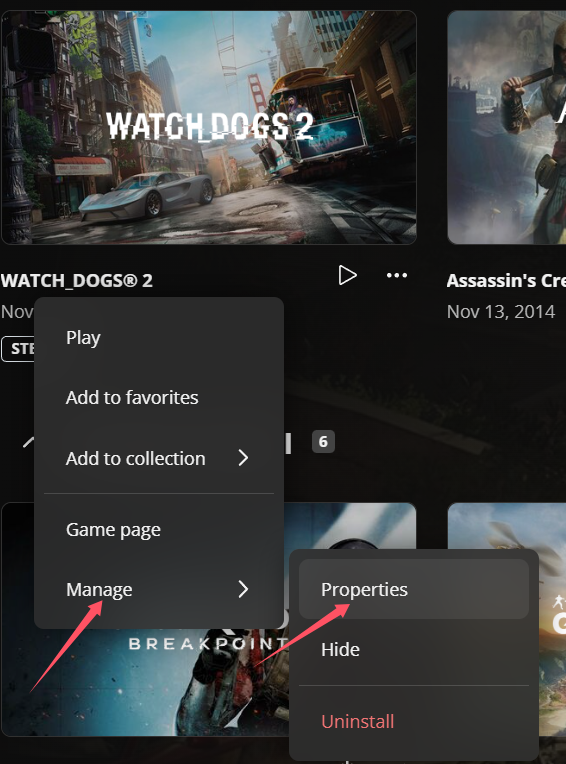
1. Click on "Game Properties" in Uplay, then click on the game's launch parameters.
2. Enter -eac_launcher and click save. Note that there is a space before it. After saving, it will look like the image below:
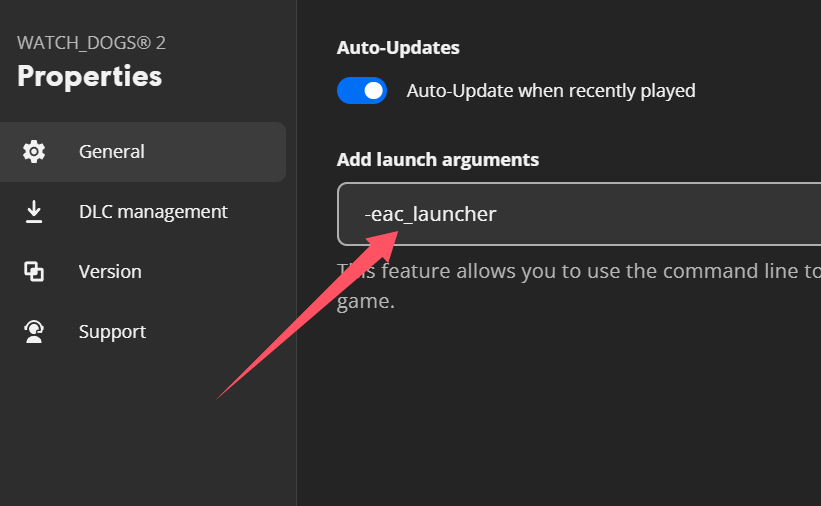
3. Then click "Start Game," enter the game, open the GameBuff software, and click "Add a BUFF" to make modifications within the game.
Steam Version
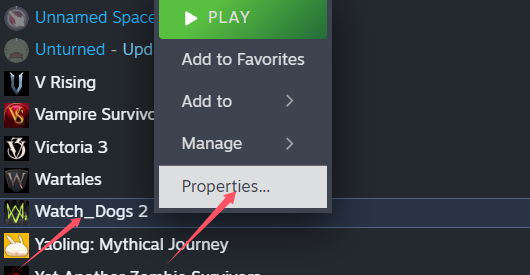
1. Right-click the game in Steam and go to "Properties."
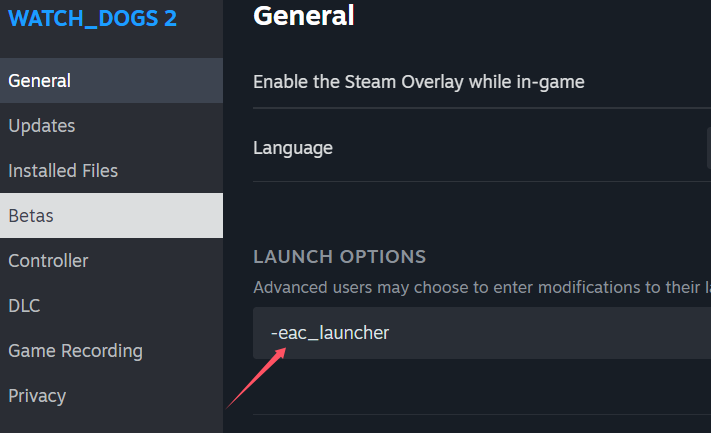
2. Click on General, then set the launch options. Enter -eac_launcher and click OK.
Note that there is a space before it.
3. Then click "Start Game," enter the game, open the GameBuff software, and click "Add a BUFF" to make modifications within the game.
Previous article
next article GameBuff's “Full Throttle Fishing” (How to Fish) Trainer Is Now Officially Available—Infinite Health, Instant Bites, and Extra Money. Enjoy the Fun of Fishing with Ease!
- Detroit: Become Human
- Baldur's Gate 3
- Sons of The Forest
- Dead Island 2
- Total War: Warhammer III
- Wall World 2
- Super Fantasy Kingdom
- PowerWash Simulator 2
- The Witcher 3: Wild Hunt
- Nioh 2 – The Complete Edition
- The Outer Worlds 2
- Sekiro Shadows Die Twice
- Escape the Backrooms
- STAR WARS™: Battlefront Classic Collection
- DAVE THE DIVER
- ACE COMBAT 7: SKIES UNKNOWN
- The First Berserker: Khazan
- SWORD ART ONLINE Fractured Daydream
- Sid Meier's Civilization VI
- Monster Hunter: World
- Resident Evil Village
- No Man's Sky
- Assetto Corsa Rally
- Assassin's Creed Valhalla
- Terraria
- Dying Light 2 Stay Human
- Dark Souls 3
- PEAK
- Dragon Quest 1 and 2 Remak
- Anno 117: Pax Romana
- Anno 117: Pax Romana Demo
- Need for Speed Unbound
- Yakuza 0 Director's Cut
- INAZUMA ELEVEN: Victory Road
- Red Dead Redemption 2
- MONSTER HUNTER RISE
- theHunter: Call of the Wild
- ELDEN RING
- Horizon Forbidden West Complete Edition
- Crusader Kings III
- Metaphor: ReFantazio
- Europa Universalis 5
- Stardew Valley
- Dispatch
- Hearts of Iron IV
- God of War
- Europa Universalis V
- R.E.P.O.
