
Conan Exiles Modifikator Anti-Cheat-Deaktivierungsvorgang
Freigabezeit 2025/07/15
1. Öffnen Sie zunächst Steam und suchen Sie das Spiel *Conan Exiles*. Klicken Sie auf „Spielen“ (*Play*).
2. Es erscheint ein Dialogfenster. Klicken Sie auf die Schaltfläche „More“ und aktivieren Sie die Option „Disable BattlEye“.
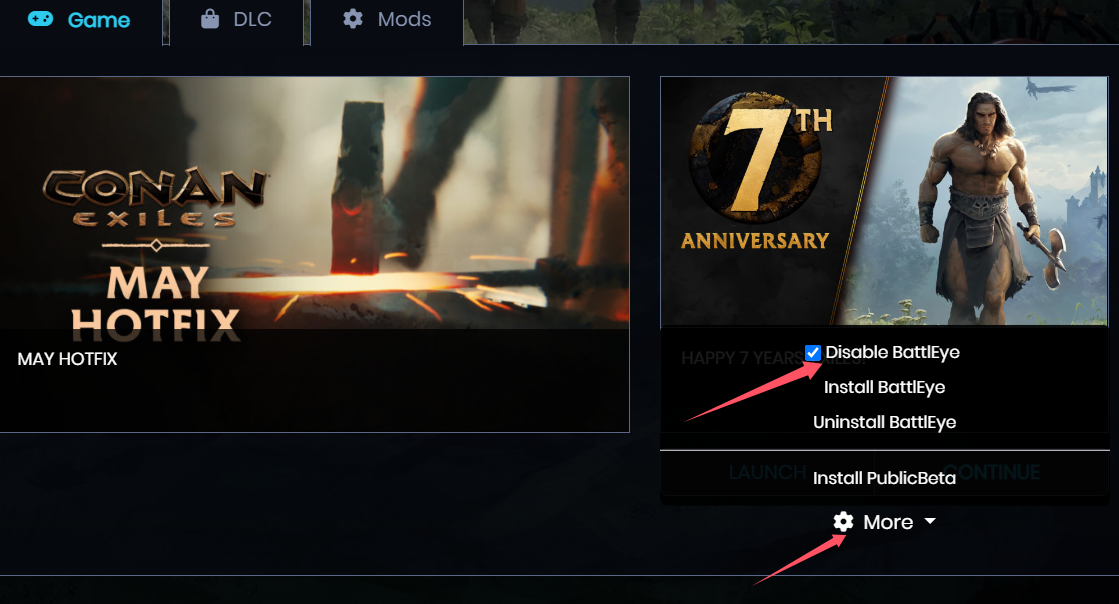
3. Wählen Sie anschließend „CONTINUE“ oder „LAUNCH“, um das Spiel zu starten.
Sobald Sie sich im Spiel befinden, öffnen Sie die GameBuff-Software und klicken Sie auf „Einen BUFF hinzufügen“, um Änderungen innerhalb des Spiels vorzunehmen.
- PowerWash Simulator 2
- SILENT HILL 2
- Palworld
- DRAGON QUEST I & II HD-2D Remake
- The Blood of Dawnwalker
- Dead Island 2
- The Elder Scrolls V: Skyrim Special Edition(steam)
- Hogwarts Legacy
- PEAK
- STAR WARS Zero Company
- Super Fantasy Kingdom
- No Man's Sky
- Yakuza 0 Director's Cut
- Sid Meier's Civilization VI
- Dying Light 2 Stay Human
- Onimusha: Way of the Sword
- Monster Hunter: World
- Need for Speed Unbound
- Wall World 2
- Sekiro Shadows Die Twice
- ACE COMBAT 7: SKIES UNKNOWN
- R.E.P.O.
- Age of Wonders 4
- Borderlands 3
- Stardew Valley
- Mount & Blade II: Bannerlord
- SWORD ART ONLINE Fractured Daydream
- Europa Universalis V
- MONSTER HUNTER RISE
- Anno 117: Pax Romana Demo
- DAVE THE DIVER
- Sons of The Forest
- Europa Universalis 5
- Assetto Corsa Rally
- Escape the Backrooms
- Resident Evil Village
- Anno 117: Pax Romana
- theHunter: Call of the Wild
- Assassin's Creed Odyssey
- Grand Theft Auto V Legacy
- ELDEN RING
- Dark Souls 3
- Phasmophobia
- How to Fish
- Horizon Forbidden West Complete Edition
- INAZUMA ELEVEN: Victory Road
- Hearts of Iron IV
- Assassin's Creed Valhalla
